Investments import with XLSX
Overview
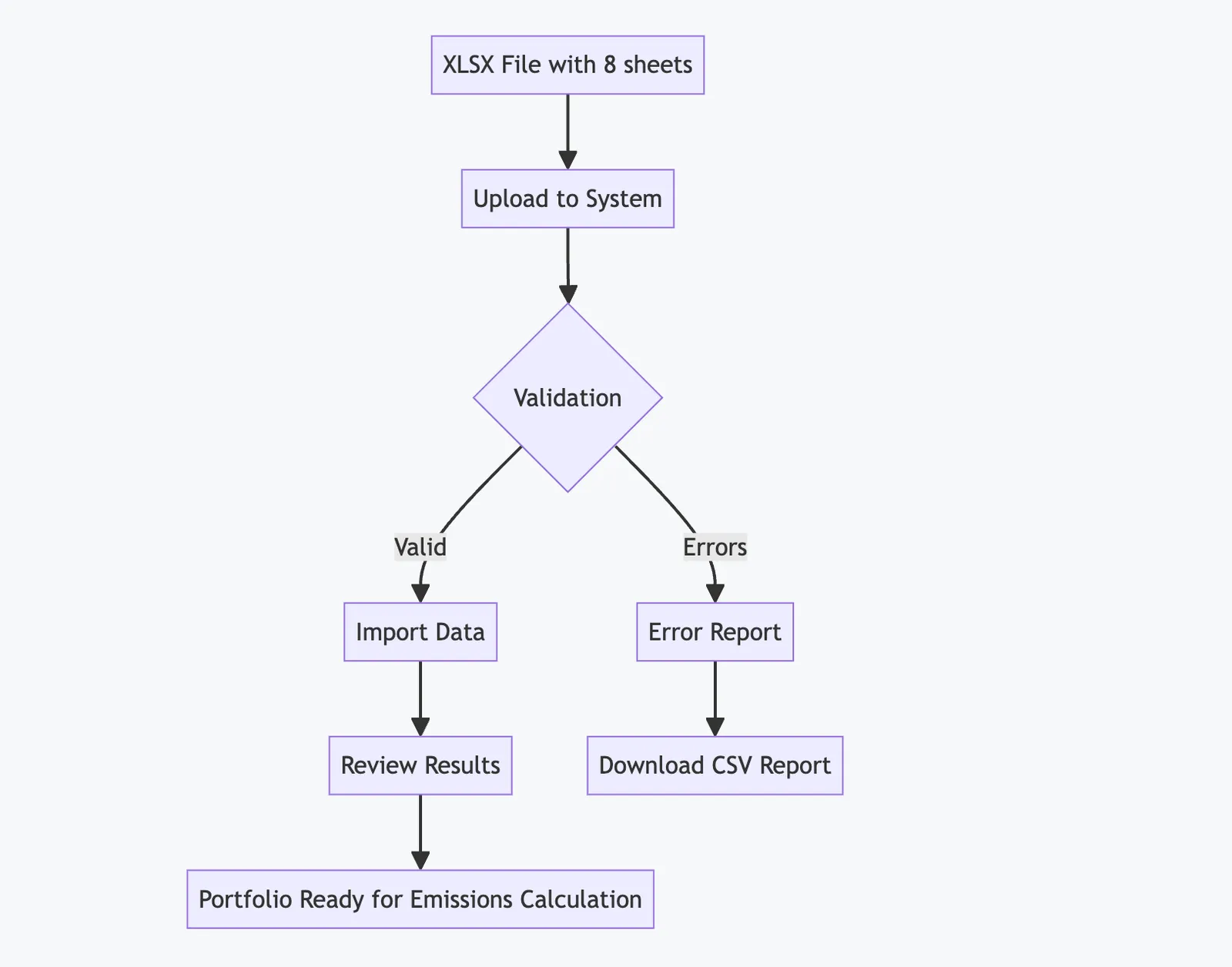
Section titled “Overview”The Investment XLSX Import feature allows you to bulk upload your entire investment portfolio data into the GHG emissions tracking system. This powerful tool enables you to import companies, households, securities, properties, vehicles, emission records, valuations, and investment exposures all in one structured Excel file.
Getting Started
Section titled “Getting Started”Accessing the Import Feature
Section titled “Accessing the Import Feature”- Navigate to your project dashboard
- Click on Data Imports in the navigation menu
- Select Investment Uploads
- Click New Investment Upload button
Download the Template
Section titled “Download the Template”Before creating your import file, download our official template that contains all required sheets with the correct column headers:
- Click Download Template on the upload page
- The template file
investments_import_template_v1.xlsxwill be downloaded - Open the file and review the sheet structure
File Structure Requirements
Section titled “File Structure Requirements”Your XLSX file must contain exactly 8 sheets in the following order:
1. Companies Sheet
Section titled “1. Companies Sheet”Contains information about companies in your investment portfolio.
| Column | Description | Required | Example |
|---|---|---|---|
| company_external_id | Your unique identifier | Yes | COMP001 |
| name | Company name | Yes | Acme Corporation |
| registration_code | Company registration number | No | 12345678 |
| lei | Legal Entity Identifier | No | 529900HNOAA1KXQJUQ27 |
| nace_code | Industry classification code | No | 62.01 |
| country | ISO country code | Yes | US |
| is_listed | Is publicly traded? | Yes | true/false |
| latest_total_assets | Total assets (numeric) | No | 1000000 |
| latest_net_turnover | Annual revenue (numeric) | No | 500000 |
| latest_financial_year | Year of financial data | No | 2023 |
2. Households Sheet
Section titled “2. Households Sheet”For individual investors or households (used for mortgages and personal loans).
| Column | Description | Required | Example |
|---|---|---|---|
| household_external_id | Your unique identifier | Yes | HH001 |
| country | ISO country code | Yes | US |
| region | State/Province/Region | No | California |
3. Securities Sheet
Section titled “3. Securities Sheet”Stock and bond securities information.
| Column | Description | Required | Example |
|---|---|---|---|
| security_external_id | Your unique identifier | Yes | SEC001 |
| company_external_id | Reference to Companies sheet | Yes | COMP001 |
| isin | International Securities ID | Yes | US0378331005 |
| security_type | Type of security | Yes | stock/bond |
| currency | ISO currency code | Yes | USD |
4. Properties Sheet
Section titled “4. Properties Sheet”Real estate properties used as collateral or direct investments.
| Column | Description | Required | Example |
|---|---|---|---|
| property_external_id | Your unique identifier | Yes | PROP001 |
| country | ISO country code | Yes | US |
| floor_area | Area in square meters | No | 150 |
| collateral_registration_date | Date registered | No | 2023-01-15 |
| energy_cert_type | Energy certificate type | No | EPC |
| energy_cert_class | Energy efficiency class | No | B |
| energy_cert_level | Energy consumption kWh/m²/year | No | 120 |
| energy_cert_valid_to | Certificate expiry date | No | 2028-01-15 |
| construction_year | Year built | No | 2010 |
| renovation_year | Last major renovation | No | 2020 |
| property_category | Type of property | No | residential |
5. Vehicles Sheet
Section titled “5. Vehicles Sheet”Motor vehicles financed or used as collateral.
| Column | Description | Required | Example |
|---|---|---|---|
| vehicle_external_id | Your unique identifier | Yes | VEH001 |
| vin | Vehicle Identification Number | No | 1HGBH41JXMN109186 |
| fuel_type | Type of fuel | Yes | gasoline/diesel/electric/hybrid |
| year_of_manufacture | Manufacturing year | Yes | 2022 |
6. EmissionRecords Sheet
Section titled “6. EmissionRecords Sheet”GHG emissions data for companies, properties, and vehicles.
| Column | Description | Required | Example |
|---|---|---|---|
| source_kind | Type of source | Yes | company/property/vehicle |
| source_external_id | Reference to source | Yes | COMP001 |
| reporting_year | Year of emissions | Yes | 2023 |
| scope | GHG Protocol scope | Yes | 1/2/3 |
| amount_tCO2e | Emissions in tonnes CO2e | Yes | 1250.5 |
| data_quality_score | PCAF quality score (1-5) | No | 2 |
| data_method | Calculation method | No | actual |
| provider | Data provider name | No | Company Report |
| nace_code | Industry code (if applicable) | No | 62.01 |
7. ValuationRecords Sheet
Section titled “7. ValuationRecords Sheet”Asset valuations for calculating attribution factors.
| Column | Description | Required | Example |
|---|---|---|---|
| source_kind | Type of asset | Yes | company/security/property/vehicle |
| source_external_id | Reference to asset | Yes | COMP001 |
| valuation_date | Date of valuation | Yes | 2023-12-31 |
| valuation_basis | Basis of valuation | Yes | market_value |
| value_amount | Valuation amount | Yes | 1000000 |
| currency | ISO currency code | Yes | USD |
8. Exposures Sheet
Section titled “8. Exposures Sheet”Your actual investment positions and loans.
| Column | Description | Required | Example |
|---|---|---|---|
| exposure_external_id | Your unique identifier | Yes | EXP001 |
| type | Investment type (see below) | Yes | Investments::ListedEquity |
| counterparty_kind | Type of counterparty | Yes | company/household |
| counterparty_external_id | Reference to counterparty | Yes | COMP001 |
| exposable_kind | Type of asset | No | security/property/vehicle |
| exposable_external_id | Reference to asset | No | SEC001 |
| outstanding_amount | Amount invested/loaned | Yes | 100000 |
| currency | ISO currency code | Yes | USD |
| valuation_date | Date of valuation | Yes | 2023-12-31 |
| units | Number of shares (equity only) | No | 1000 |
| face_value | Bond face value | No | 100000 |
| contract_number | Loan contract ID | No | LOAN123 |
| loan_type | Type of loan | No | term_loan |
| maturity_date | Loan/bond maturity | No | 2028-12-31 |
| collateral_value | Value of collateral | No | 150000 |
| collateral_id | Reference to collateral | No | PROP001 |
Investment Types
Section titled “Investment Types”The system supports 9 investment types following PCAF methodology:
- Investments::ListedEquity - Publicly traded stocks
- Investments::UnlistedEquity - Private company equity
- Investments::CorporateBond - Corporate bonds
- Investments::BusinessLoan - Commercial loans to companies
- Investments::ProjectFinance - Infrastructure/project financing
- Investments::CommercialRealEstate - Direct property investments
- Investments::Mortgage - Residential property loans
- Investments::MotorVehicleLoan - Vehicle financing
- Investments::SovereignBond - Government bonds
Import Process
Section titled “Import Process”Step 1: Prepare Your Data
Section titled “Step 1: Prepare Your Data”- Gather all investment data from your portfolio management systems
- Map your data to the required columns in each sheet
- Ensure data quality:
- All external IDs must be unique within their sheet
- Referenced IDs must exist (e.g., company_external_id in Securities must exist in Companies)
- Financial years should be between 2000 and next year
- All amounts should be positive numbers
Step 2: Upload Your File
Section titled “Step 2: Upload Your File”- Navigate to Investment Uploads
- Click Choose File or drag and drop your XLSX file
- The file will begin processing immediately
- Wait for the upload to complete (larger files may take a few moments)
Step 3: Review Results
Section titled “Step 3: Review Results”After processing, you’ll see a comprehensive results page showing:

Summary Section
Section titled “Summary Section”- Total records processed
- Successfully imported (created + updated)
- Failed records requiring attention
Detailed Results by Sheet
Section titled “Detailed Results by Sheet”For each sheet, you’ll see:
- Number of records created (new)
- Number of records updated (existing)
- Number of records that failed validation
Error Handling
Section titled “Error Handling”If there are errors:
- Review the error details showing:
- Sheet name
- Row number
- External ID
- Specific error message
- Click Download Error Report to get a CSV file
- Fix the errors in your source file
- Re-upload the corrected file
Data Validation Rules
Section titled “Data Validation Rules”Common Validation Rules
Section titled “Common Validation Rules”- Required Fields: All columns marked as “Required” must have values
- Unique Constraints:
- ISIN codes must be unique within your project
- LEI codes must be globally unique
- External IDs must be unique within each sheet
- Reference Integrity:
- All referenced external IDs must exist in their respective sheets
- Import sheets in the correct order to ensure references are valid
- Date Formats: Use YYYY-MM-DD format (e.g., 2023-12-31)
- Boolean Values: Use true/false (lowercase)
- Country Codes: Use 2-letter ISO codes (e.g., US, GB, DE)
- Currency Codes: Use 3-letter ISO codes (e.g., USD, EUR, GBP)
Financial Data Rules
Section titled “Financial Data Rules”- Amounts: Must be positive numbers (≥ 0)
- Financial Years: Between 2000 and current year + 1
- Valuation Dates: Should be recent and consistent
- Data Quality Scores: Integer between 1 (best) and 5 (worst)
Best Practices
Section titled “Best Practices”1. Start with Clean Data
Section titled “1. Start with Clean Data”- Remove duplicate records before import
- Standardize company names and identifiers
- Verify all reference relationships
2. Use Consistent Identifiers
Section titled “2. Use Consistent Identifiers”- Create a mapping between your internal IDs and external IDs
- Keep this mapping for future updates
- Use meaningful prefixes (e.g., COMP_, SEC_, PROP_)
3. Import in Stages
Section titled “3. Import in Stages”For large portfolios:
- Start with a subset of data to test
- Verify the import works correctly
- Proceed with the full dataset
4. Regular Updates
Section titled “4. Regular Updates”- Schedule regular imports (monthly/quarterly)
- Use the same external IDs to update existing records
- The system will automatically update rather than duplicate
5. Data Quality Scores
Section titled “5. Data Quality Scores”Assign PCAF data quality scores accurately:
- Score 1: Audited GHG emissions data
- Score 2: Non-audited GHG emissions data
- Score 3: Average data from peer companies
- Score 4: Proxy data based on region/sector
- Score 5: Estimated data with high uncertainty
Troubleshooting
Section titled “Troubleshooting”Common Issues and Solutions
Section titled “Common Issues and Solutions”“Missing reference” errors
Section titled ““Missing reference” errors”Problem: Referenced external ID doesn’t exist Solution: Ensure all sheets are present and IDs match exactly (case-sensitive)
“Constraint violation” errors
Section titled ““Constraint violation” errors”Problem: Duplicate ISIN or LEI codes Solution: Check for duplicates in your data or existing system records
“Validation failed” errors
Section titled ““Validation failed” errors”Problem: Data doesn’t meet validation rules Solution: Review the specific field requirements and format
File won’t upload
Section titled “File won’t upload”Problem: File is too large or wrong format Solution:
- Ensure file is .xlsx format (not .xls or .csv)
- Split very large files into smaller batches
- Check file isn’t corrupted
Getting Help
Section titled “Getting Help”If you encounter issues:
- Download the error report CSV for detailed information
- Review this documentation for requirements
- Contact support with:
- Your error report
- Description of the issue
- Sample of problematic data (anonymized if needed)
Next Steps
Section titled “Next Steps”After successful import:
- Verify Data: Review imported records in the Investments section
- Calculate Emissions: Run financed emissions calculations
- Generate Reports: Use the reporting tools to analyze portfolio emissions
- Set Targets: Establish emission reduction targets based on baseline
Appendix: Column Aliases
Section titled “Appendix: Column Aliases”The system recognizes multiple column name variations for flexibility:
Companies Sheet
Section titled “Companies Sheet”company_external_id: company_id, external_id, idname: company_name, entity_nameregistration_code: reg_code, company_numberlatest_total_assets: total_assets, assetslatest_net_turnover: revenue, turnover, sales
Securities Sheet
Section titled “Securities Sheet”security_external_id: security_id, external_id, idsecurity_type: type, instrument_type
Properties Sheet
Section titled “Properties Sheet”property_external_id: property_id, external_id, idfloor_area: area, size, sqmenergy_cert_class: energy_class, epc_rating
Exposures Sheet
Section titled “Exposures Sheet”exposure_external_id: exposure_id, external_id, idoutstanding_amount: amount, balance, exposure_amountvaluation_date: date, as_of_date
Note: While aliases are supported, using the primary column names ensures the best compatibility.